Bulin 47 AI Video Prompts for Nightclub Freestyle Scenes
Use Bulin 47 AI video prompts for DIY nightclub scenes, with shot and audio examples. Find separate topic ideas for the on-site Rap Show generator.
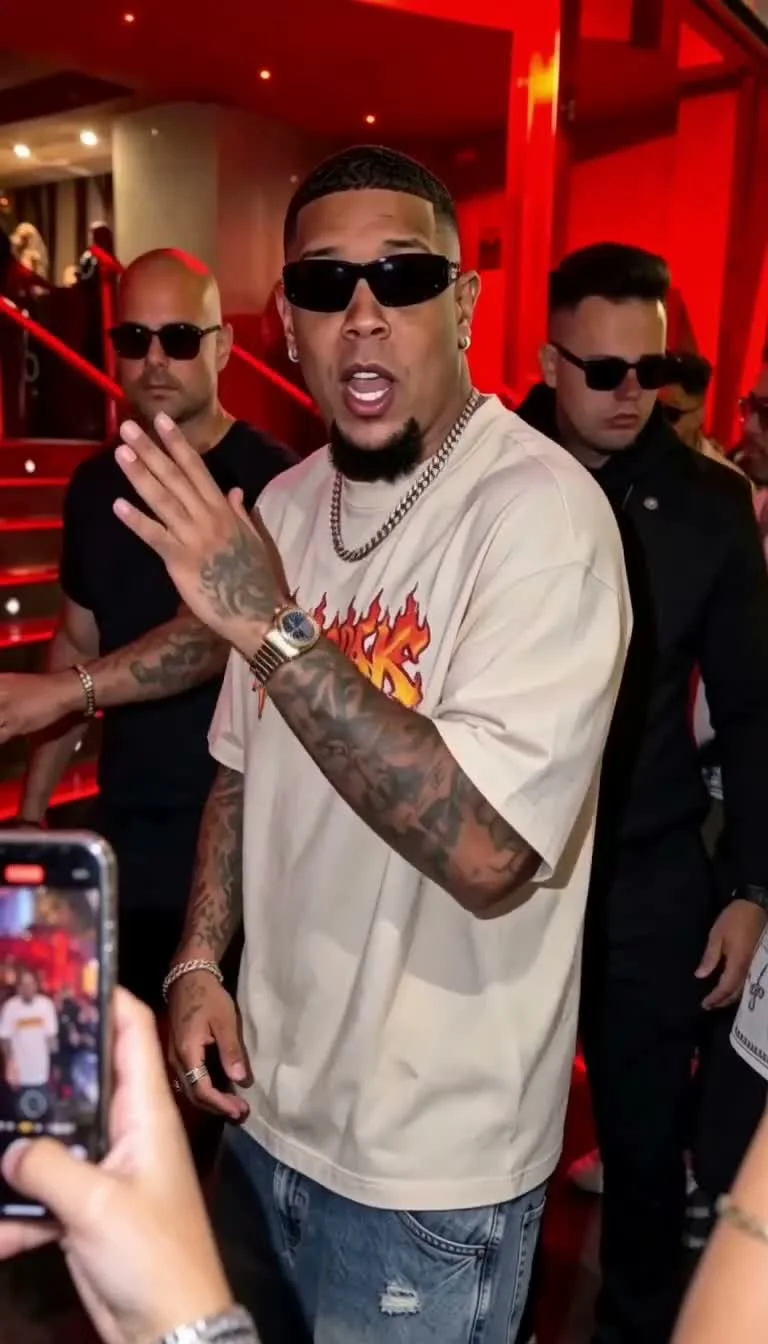
Bulin 47 AI video prompts: where to use them
These DIY examples explore a Bulin 47 freestyle scene direction: red neon club lighting, lively crowd energy, and a charismatic lead who pauses to drop bars on tempo.
- On this site: Select 5, 10, or 15 seconds in the generator; the studio uses built-in scene and action references. Only the song-topic examples below belong in the on-site details field; the full video and audio prompts are for external models.
- In general video models (Kling, Runway, Luma): Paste the prompts below into your video tool. For multi-clip sequences in the same camera angle, try the last frame as the next starting image only if your external model supports that input. Inspect the join; it does not guarantee continuity.
Template overview: What is Bulin 47 freestyle AI video? · Step-by-step workflow: How to make a Bulin 47 AI video.
Adapting Bulin 47 AI video prompts for a shot
- Focus on one shot per generation: Pick Shot 1 (stop-and-answer), Shot 2 (two-person exchange), or the fan opener. Keeping one focal action per generation preserves clean motion.
- Provide clear references: Supply your character photo, along with any neon club door stills or motion guides your tool supports.
- Pair with rhythmic audio: Match each visual with Latin trap, drill, or urban beats at 90–105 BPM.
- Customize the details: Swap wardrobe colors, topics, and city names to make the performance your own.
- Verify asset rights: If you use external reference stills or video clips, ensure you hold proper permissions before publishing.
Visual direction for a Bulin 47 video
Night street outside a club entrance. Red neon and warm spill on skin. Handheld camera, shallow depth of field, authentic crowd motion. Lead silhouette readable in the first second. Bodyguards and fans stay secondary—never steal the beat from the lead’s hands and face rhythm.
Wardrobe anchors people recognize without copying a single protected look: sunglasses, bold mesh or club shirt (pink mesh is a common reference accent), confident posture. Fan: curly hair, portable speaker, phone up.
Bulin 47 freestyle shot: stop, turn and answer
When to use: the dramatic “hears the fan → stops at the red door → scans crowd → freestyles” beat.
Scene-still reference for Shot 1 energy: neon door, crowd heat, freestyle body language—use as vibe, then write your own bars and wardrobe.
DIY Bulin 47 video prompt (English)
Medium shot, handheld camera. Outside a red-neon nightclub entrance at night, a bald rapper in sunglasses and a pink mesh shirt stops while escorted by bodyguards. Attracted by a fan’s beat from a portable speaker, he turns toward the crowd, scans the excited fans, then starts a confident freestyle. He nods and rhythmically bounces both hands on the tempo. Realistic nightclub street lighting, natural crowd motion, shallow depth of field, authentic street atmosphere. Freestyle performance scene from a character photo and this description.
DIY Bulin 47 视频提示词(中文)
手持中景。戴墨镜、穿粉色镂空衬衫的光头说唱歌手在保镖护送下停在红光夜店门前。他被便携音响里的节奏吸引转身,环顾热情粉丝,随后开嗓即兴说唱。双手随节奏交替打点并点头。真实夜店街头灯光,自然人群动态,浅景深。根据角色照片与描述生成 freestyle 场景。
DIY Bulin 47 rap audio prompt
Style: Mid-tempo Latin trap freestyle, mostly acapella with subtle crowd reverb and a light ambient kick. BPM about 95–100.
Content: A charismatic rapper greets his hometown energy and says he is always ready to drop bars wherever the night takes him. Original lines only. Keep delivery clear—not ultra-fast.
Structure: 1–2 seconds of crowd walla, then freestyle.
Bulin 47 rap video: a DIY two-person exchange
When to use: fan and lead trade bars in front of the neon door; smiles, pointing, arm swings.
DIY Bulin 47 video prompt (English)
Medium two-shot, dynamic framing. Outside a neon nightclub door, a stylish rapper in sunglasses and a pink mesh shirt faces a curly-haired fan holding a portable speaker. They trade an energetic freestyle: both bob their heads, point, and swing their arms in sync with the beat. The rapper smiles and gestures animatedly while security in the background watches and grins. Handheld feel, red and warm lighting, shallow depth of field, lively authentic atmosphere. Call-and-response freestyle scene from character photos and this brief.
DIY Bulin 47 视频提示词(中文)
双人中景,动态构图。霓虹夜店门前,戴墨镜、穿粉色镂空衫的说唱歌手与手持便携音响的卷发粉丝面对面即兴对唱。两人同步点头,随节奏挥臂、指点打拍。说唱歌手笑容明亮,动作夸张;背景保镖放松微笑。手持感,红暖光,浅景深。根据角色与描述生成对唱 freestyle 场景。
DIY Bulin 47 rap audio prompt
Style: Upbeat street drill / Spanish rap, call-and-response, slight portable-speaker grit, enthusiastic cheering under the vocal. BPM about 98–105.
Content: Fan hypes the lead’s street legacy in short bars; lead answers with witty punchlines; they share a laugh as the crowd cheers. Original lyrics only.
Structure: Fan line → lead line → shared laugh / cheer button.
Bulin 47 video: a separate fan opener
Use this if you want a separate opener segment to edit before Shot 1 (length = whatever your model allows).
DIY Bulin 47 video prompt (English)
Medium close-up, night street. A young fan with curly hair holds a portable speaker and phone, rapping rhythmically with hand gestures. Neon signs and a crowded urban background behind them. Handheld camera, energetic but readable motion, authentic party-street atmosphere. Scene from a character photo and this description.
DIY Bulin 47 rap audio prompt
Latin trap freestyle acapella over ambient crowd noise, mid-tempo, crisp energetic vocal, portable speaker coloration, BPM ~100. Short hype bars inviting someone to answer. Original lines only.
Bulin 47 rap: one main performer
When you only have one character and no fan:
Medium shot, a stylish rapper wearing sunglasses and trendy nightlife clothing outside a neon-lit nightclub, surrounded by security and fans. The rapper turns toward the crowd, gestures rhythmically, and delivers an energetic freestyle with expressive face and both hands on the beat. Cinematic handheld camera, vibrant red and warm lighting, shallow depth of field, authentic street atmosphere. Create a new freestyle performance scene from the character photo and this description.
Companion audio:
Latin trap freestyle acapella, mid-tempo flow, energetic Dominican street vibe, crisp male vocals, ambient crowd noise in background, BPM 90–105. Original bars about being ready anytime the night calls.
Song topics for an on-site Bulin 47 rap
Keep these short; the studio turns them into song direction:
- Friendship:
Leo and Sam, still undefeated since school - Praise:
Mara owns every room she walks into - Encouragement:
keep going, the night is still young - Celebration:
exam passed, first round is on us
Choose the theme button in the form, then put only names and subject details in the text box. Do not paste a second theme label or video/audio instructions into that field.
Reviewing DIY Bulin 47 video prompts
- One action family per clip: turn + hand bounce, or exchange pointing—avoid asking the character to turn, rap, high-five, and walk inside all in one prompt.
- Specify the lighting: “red neon club door with warm rim light” is a concrete lighting request you can compare against the result, unlike “cool aesthetic.”
- Anchor the tempo: “rhythmically bounces both hands on tempo” gives the model a clear physical cue.
- Maintain readable framing: use a medium shot when the performer is the main subject, then inspect the result for face and hand errors. Framing instructions do not guarantee a clean result.
- Preserve shot continuity: if your external model supports a starting image, try the last frame for the next segment and check for face, lighting and camera changes at the join.
- Respect rights: verify permissions for any external photos, videos, or music before posting online. On this site, Freestyle edits a fixed scene still and Rap Show prepares the selected scene from your photo. Both generate new video using built-in action references. Review your inputs and outputs under our AI Content Policy.
Turning an idea into a Bulin 47 rap topic
The on-site Bulin 47 rap video field needs a subject, not the entire DIY shot prompt. Start with the reason for the clip. A friendship song might be about two people who have known each other since school. A celebration might be about a graduation or a driving test. Those details give the requested song a focus while the template supplies the performance setup.
Choose the theme button first. If you select friendship, type the friends’ names and one memory; there is no need to type “friendship” again. The service joins the selected theme with your optional details. Keep names easy to distinguish and avoid squeezing several unrelated occasions into a short video. This is a useful way to organize a request, not a guarantee that the model will sing every word.
For a Bulin 47 rap, “For Mara, who helped the team finish the project” is a subject. “Put Mara at a new club door, change the lens, add a second rapper and use a 100 BPM song” mixes scene and audio directions into the subject box. The second request does not add those controls to the on-site form. Put the scene choice in the Rap Show scene control, and use an external model if a particular lens, duet or tempo is essential.
Freestyle uses the same themes for its generated background song. A Bulin 47 freestyle dance request can celebrate a graduation without asking the dancer to perform a literal graduation scene. Keep the fixed nightclub in mind when deciding whether Freestyle fits the occasion. Choose Rap Show when the main performer delivering the song is more important than following dance moves.
Adapting Bulin 47 AI video prompts for DIY
Before using a Bulin 47 AI video prompt outside this site, check which inputs the exact model accepts. A text-to-video mode may have no place for your photo. An image-to-video mode may accept a starting image but no separate motion clip. A reference-video mode may use different limits and fields. These are separate contracts; a prompt cannot make an unsupported input work.
Take the shot examples as creative starting points. If your authorized character photo has different hair or clothing, replace the bald performer and pink shirt description with features that match that person. If you want a quieter setting, reduce the background crowd instructions. Keep the main action clear: turn toward the sound, gesture on the beat, or exchange one line. Change the description to suit your intended shot, then compare the result with that request.
A Bulin 47 video prompt does not establish permission to use the pictured person. Use your own portrait or a portrait whose subject has authorized the intended use. Treat a reference soundtrack separately: having a video file does not mean you may copy its music. The audio examples here ask for original lines and a style direction, rather than a particular commercial track or celebrity voice.
For the sample DIY audio, 90–105 BPM is simply a starting choice. You can change it in an external audio tool that exposes tempo. On-site Bulin 47 AI video has no BPM slider or custom voice upload. Do not infer those capabilities from an example in this article. If the chosen external video model lacks native audio, create a separate track and synchronize it in your editor.
Reviewing a Bulin 47 video before sharing
Watch the Bulin 47 video once with the sound on and once while concentrating on the picture. Check whether the main subject remains recognizable, whether hands change shape, and whether the movement follows the intended performance. For a rap, listen for names, unwanted words and syllables that sound unclear. A convincing scene does not make an incorrect lyric suitable for sharing.
For a sequence of DIY clips, look at the join frame by frame. Compare the last frame of one clip with the first frame of the next: face direction, clothing, lighting and camera position all matter. If the external model accepts a starting image, try reusing the previous final frame. You may still need a cut, a trim or a separate transition in the editor. This workflow is not an on-site continuation feature.
Finally, check the usage permissions and the destination. A Bulin 47 rap video made for a friend still needs that person’s permission if their likeness is used. Avoid captions that present synthetic speech as something they actually said. Download the result you want to keep; generated files are not promised permanent storage. The how-to guide covers the form, credit quote and result panel.
Choosing where to use Bulin 47 AI video prompts
| Need | Use | | ------------------------------------------ | ----------------------------------------------------------------------------- | | Clip from one photo, packs, download | Studio (Freestyle or Rap Show) | | Exact shot language + separate audio model | Prompts above (Path B in the how-to) | | Occasion-first bars without camera prose | Site topic + detail fields |
Site billing reminder: built-in templates are about 450 / 600 / 750 credits for 5 / 10 / 15 seconds (30 credits/sec + fixed 10s reference). Packs 600 / 1800 / 3000. Clarity 9:16 · 768P. Details on pricing.